
Report an issue
Describe the problem you're experiencing with AI Prompt Spark.
The ultimate prompt command center. Organize, save, and execute reusable AI prompts directly in your browser. Perfect for teams working with ChatGPT, Claude, and other AI services.
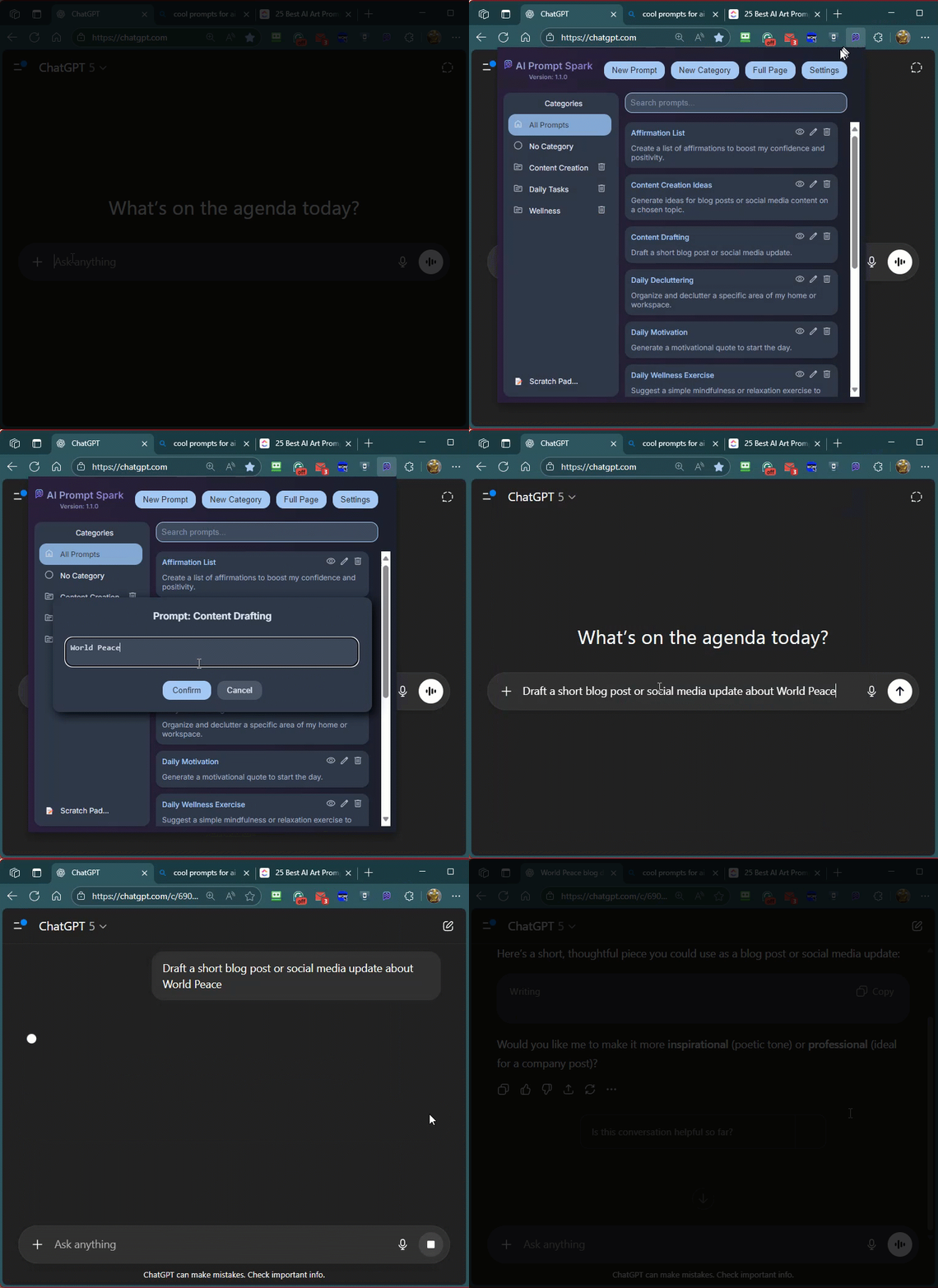
AI Prompt Spark is fast, intuitive, and stays out of the way until you need it. Whether you're building customer support responses, marketing copy, code snippets, or technical documentation, organize your prompts in categories, search instantly, and execute with a single click.
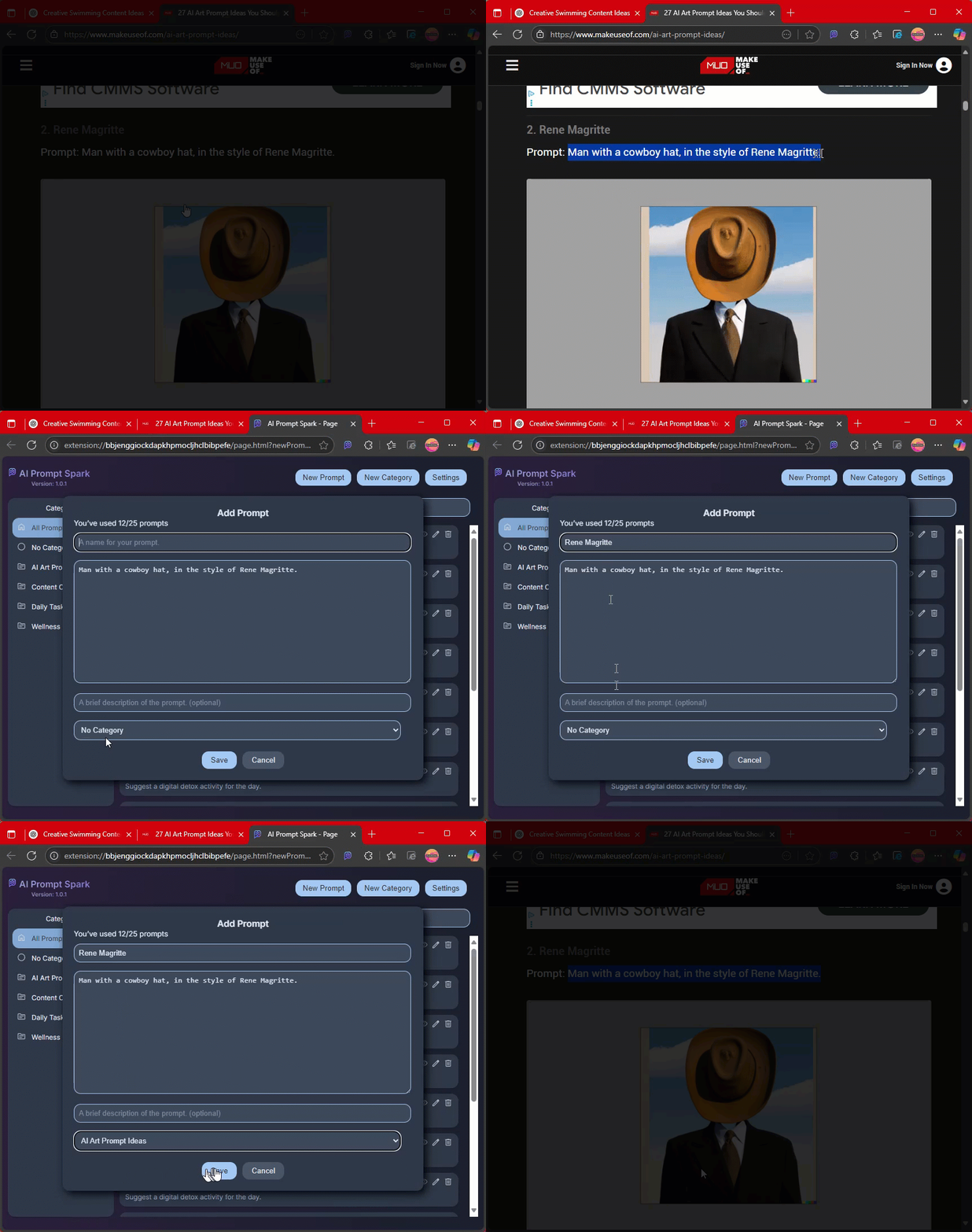
One-click insert to AI chat or copy to the clipboard
Categorize prompts and manage categories
Backup/Share prompts through Export/Import
Right-click to save prompts from websites to your library
Light and dark theme options
Add, edit, delete, and organize prompts
Use prompts with variables and custom tips for maximum reusability
Search prompts by title or description
Save up to 25 prompts for free, or unlock unlimited with a one-time upgrade
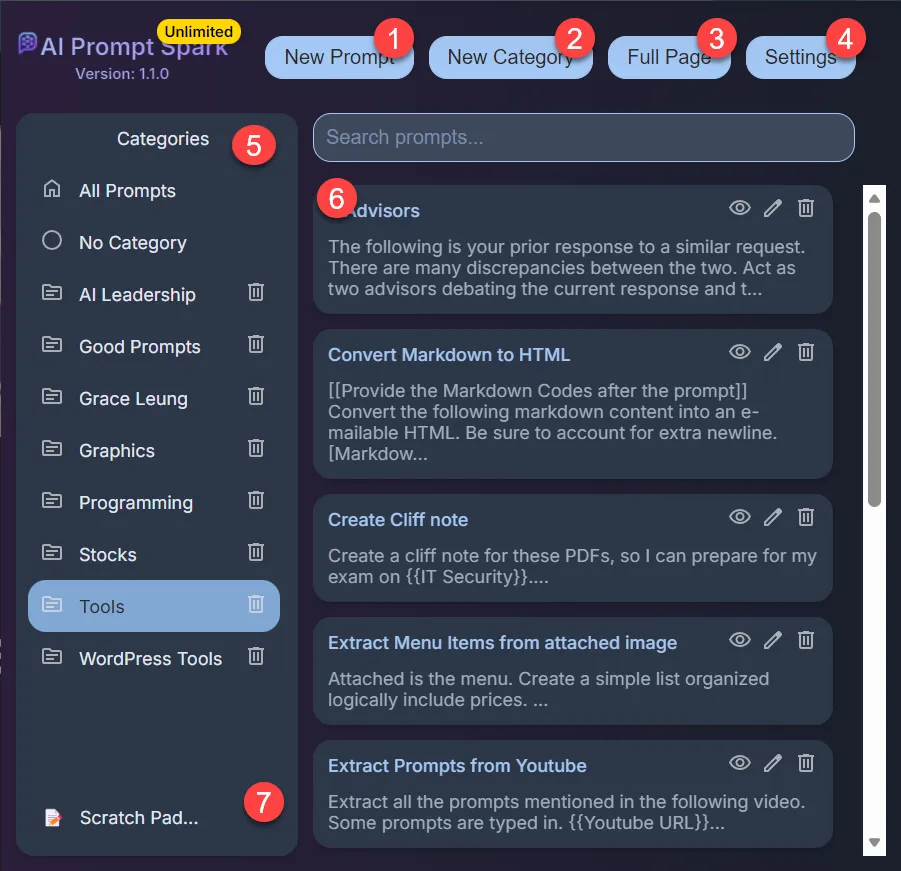
Add a new prompt to your library
Create a new prompt category to organize your prompts
Open prompts management in a full browser window for easier access
Customize themes, manage email, and upgrade your account
Click to view prompts by category
View all prompts under the selected category with preview, edit, and delete options
Opens an external workspace for drafting ideas or experimenting with prompts
AI Prompt Spark helps you effortlessly manage and utilize AI prompts directly within your browser. Whether you're using ChatGPT, Claude, or other AI services, organize your prompts and access them instantly.
Install AI Prompt Spark directly from the Chrome Web Store by clicking 'Add to Chrome' and confirming the installation by clicking 'Add extension'. The extension will appear in your browser toolbar.
Click New Prompt, enter a title and text, add an optional description. Use placeholders
{{variable}} to prompt for user input, and [[info]] to display instructions or tips.
Assign it to a category and save. Free users can store up to 25 prompts; Pro users have unlimited storage.
{{variable}} <- prompts user input when used. [[info]] <- displays instructions or tips. Add categories by clicking New Category. Rename or delete categories by hovering over them and using the edit or delete icons. Switch between categories to view and organize your prompts efficiently.
Type keywords into the search bar to filter prompts by title or description within the selected category. Find your prompts quickly even with a large library.
Click on a prompt title to open it. Fill in any required placeholders, then the prompt will auto‑paste into the active text field or be copied to your clipboard for use in your AI chat.
Access Settings to toggle themes, export/import prompts as JSON, clear all prompts and categories, update your license email, and upgrade to the Unlimited (Pro) version.
Right‑click any selected text on a webpage and choose Save as New Prompt to store it instantly — perfect for saving ideas you find online.
The Scratch Pad feature opens a simple note‑taking companion at scratchpad.irus8dev.com for drafting ideas or experimenting with prompts before adding them to your library.
Free users can store up to 25 prompts. The Unlimited badge appears for Pro users, and verification is done automatically via your registered email.
Create prompts with {{variable}} placeholders to make them reusable for different contexts. Each time you use the prompt, you'll be asked to fill in the variables.
Use [[info]] to embed instructions or tips directly in your prompts. This helps you remember how to use each prompt effectively.
Export your prompts as JSON files regularly to create backups and share your prompt library with teammates.
Open prompts management in full-page mode for easier organization and bulk editing of your entire library.
Right-click any text online and select "Save as New Prompt" to quickly capture ideas, code snippets, or reference material.
Switch between light and dark themes in Settings to match your workspace and reduce eye strain.
25 Prompts
Unlimited
Start managing your AI prompts in seconds. Available free on the Chrome Web Store.
Having issues with AI Prompt Spark? Let us know and we'll help you out.
Describe the problem you're experiencing with AI Prompt Spark.